Sample App
The repository includes a sample Compose application demonstrating SDK usage — toggle between pinned and plain clients, send requests, and inspect response headers in a debug log.
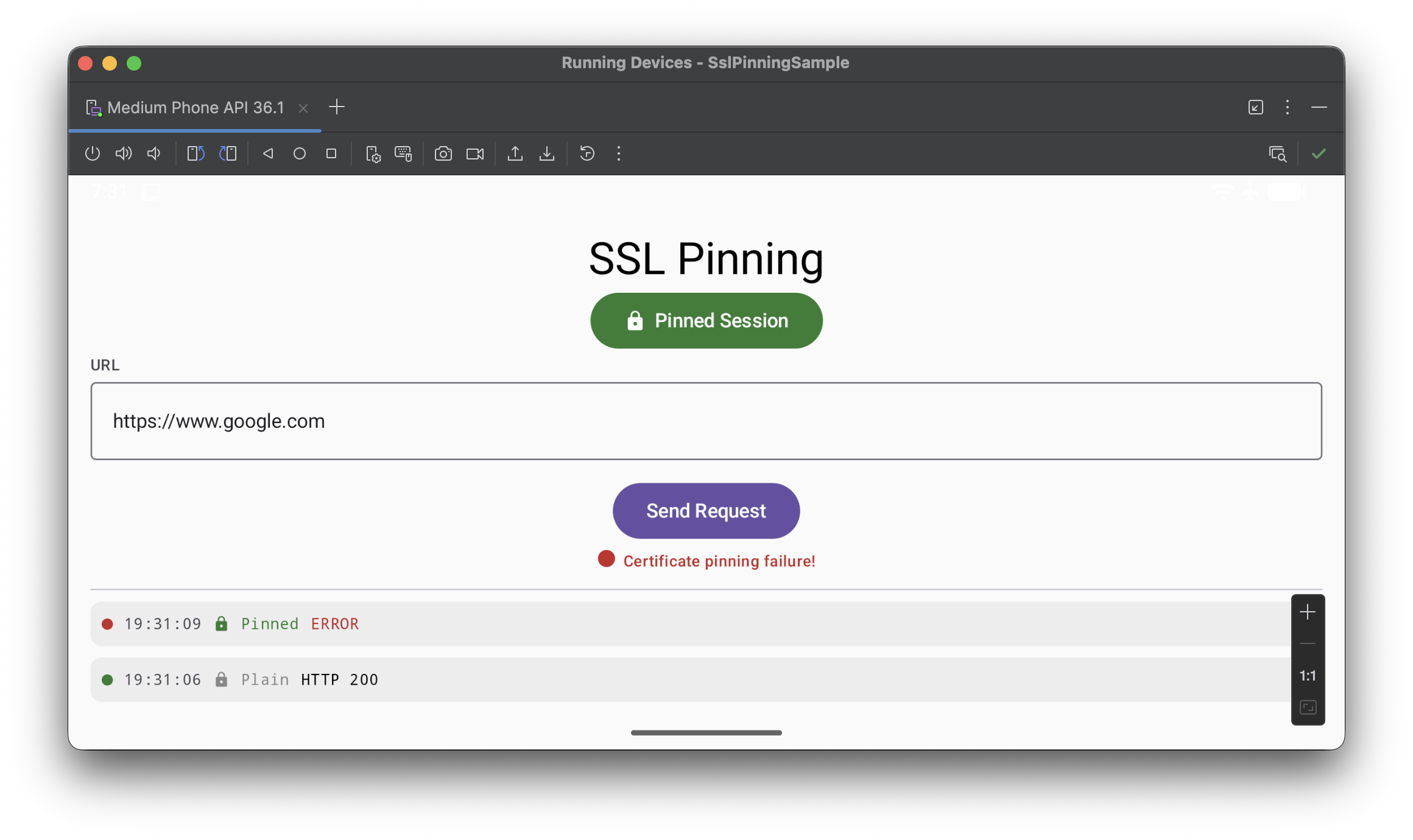
1
Create local.properties
Create local.properties in the project root:
SSL_PINNING_ENDPOINT=https://ssl-pinning.example.com/api/v1/google.com.json
SSL_PINNING_SIGNING_KEY_B64=<base64 of pub.pem>
2
Open and run
Open the project in Android Studio, select the :app module, and run on an emulator or device (API 24+).
Installation
1
Add Maven Central to repositories
Make sure mavenCentral() is declared in your settings.gradle.kts:
dependencyResolutionManagement {
    repositories {
        mavenCentral()
    }
}
2
Add the dependency
Add to your module's build.gradle.kts:
dependencies {
    implementation("io.github.sslpinninglib:sslpinning:1.0")
}
3
Initialize the SDK
val config = SslPinningConfig(
    endpointUrl    = "https://ssl-pinning.example.com/api/v1/google.com.json",
    signingKeyBase64 = "<base64 of pub.pem>",
)

val result = SslPinningClient.initialize(
    config     = config,
    httpClient = OkHttpClient(),
)

result
    .onSuccess { client ->
        val pinnedClient = client.createPinnedClient() // use for all HTTPS requests
        val plainClient  = client.createPlainClient()  // use only for non-pinned requests
    }
    .onFailure { error ->
        // initialization failed — do not proceed with network requests
    }
suspend: initialize() is a
suspend function — call it from a coroutine scope
(e.g. viewModelScope or lifecycleScope).
The httpClient you pass in is reused as the plain client
and as the base for the pinned client.
How It Works
Initialization is a single suspend call that fetches, verifies, and pins in one step.
| # | Step |
|---|---|
1 | Fetch the signed key registry from endpointUrl via HTTP GET |
2 | Verify the response signature using JCS canonicalization + RSA PKCS#1 v1.5 + SHA-512 |
3 | Each verified key is bound to its domainName as a sha256/ OkHttp pin |
4 | An OkHttp CertificatePinner is built and applied to the pinned client |
5 | Both clients (plain and pinned) are returned to the caller |
Fails closed — initialization throws an exception if the endpoint is
unreachable, the response format is invalid, the cryptographic signature does not verify,
or the key list is empty.
Key Registry Response Format
Your backend endpoint must return JSON in the following format. See ssl-pinning/ssl-pinning for the server implementation.
{
  "payload": {
    "keys": [
      {
        "domainName": "www.example.com",
        "key":        "base64-encoded-sha256-spki-hash",
        "fqdn":       "www.example.com",
        "expire":     5488607,
        "date":       "2025-12-14T21:02:11Z"
      }
    ]
  },
  "signature": "BASE64_ENCODED_RSA_SHA512_SIGNATURE"
}| Field | Description |
|---|---|
domainName | Hostname pattern passed directly to OkHttp CertificatePinner. Supports wildcards: *.example.com. |
key | Base64-encoded SHA-256 hash of the certificate's Subject Public Key Info (SPKI) — same format as OkHttp pins. |
fqdn | Optional. The fully-qualified domain name the server dialed to extract the key. |
expire | Optional. Unix timestamp (seconds) after which the key should be considered expired. |
signature | RSA PKCS#1 v1.5 + SHA-512 over the JCS-canonicalized JSON of the payload field. |
Cryptography
| Property | Value |
|---|---|
Canonicalization | JSON Canonicalization Scheme (JCS, RFC 8785) |
Signature algorithm | RSA PKCS#1 v1.5 |
Hash function | SHA-512 (signature) · SHA-256 (SPKI pin) |
Public key format | PEM · DER/SPKI — RSA 1024 / 2048 / 4096 bit |
Pin type | SPKI SHA-256 via OkHttp CertificatePinner |
Dependencies | OkHttp 4.x · Kotlin Coroutines · no custom crypto — uses standard JCA/Android APIs |
Security Properties
| Property | |
|---|---|
MITM protection | Validates leaf certificate SPKI hash against a verified remote registry |
Custom CA injection | Blocked — OkHttp CertificatePinner rejects connections that don't match pinned hashes |
Key substitution | Prevented via RSA-SHA512 cryptographic signature on the registry payload |
Key rotation | Remote — no app update required; update the registry on the server |
Binary hardcoding | None — no pins are embedded in the app binary |
Wildcard matching | Delegated to OkHttp CertificatePinner — *.example.com matches one subdomain level |