Sample App
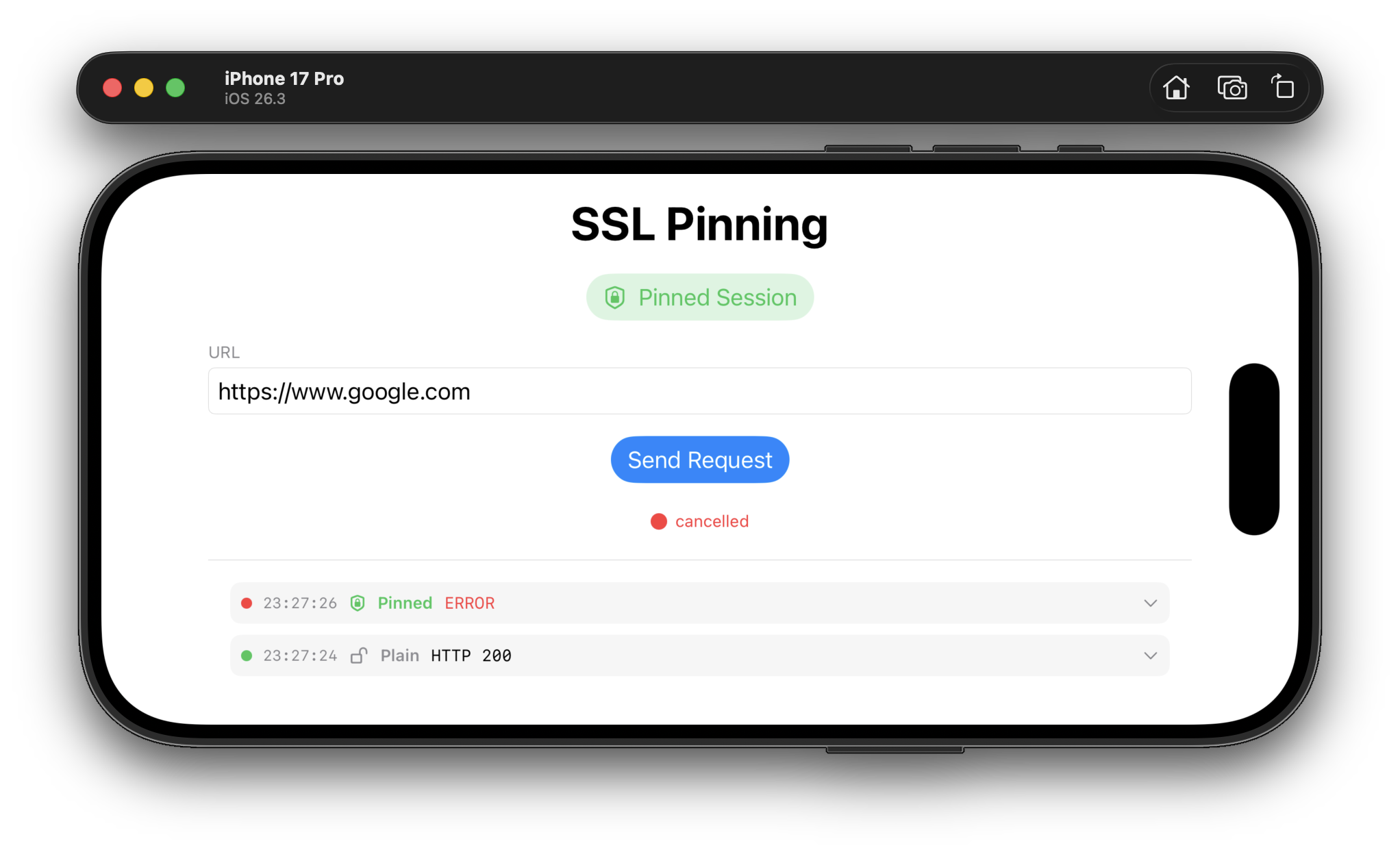
The repository includes a SwiftUI sample app demonstrating SDK usage — toggle between pinned and plain sessions, send requests, and inspect response headers in a debug log.
Copy the config template
cp App/Config.xcconfig.example App/Config.xcconfigFill in your values
SLASH                    = /
SSL_PINNING_ENDPOINT     = https:$(SLASH)$(SLASH)ssl-pinning.example.com/api/v1/google.com.json
SSL_PINNING_SIGNING_KEY_B64 = <base64 of pub.pem>Open and run
Open SslPinning.xcworkspace in Xcode, select the App scheme, and run on a simulator or device.
Installation
Add via Xcode
File → Add Package Dependencies and enter the repository URL, or add to your Package.swift:
dependencies: [
    .package(url: "https://github.com/ssl-pinning/apple-sdk.git", from: "1.1.0"),
],
targets: [
    .target(name: "YourTarget", dependencies: ["SslPinning"]),
]Get the public signing key
Obtain the base64-encoded RSA public key from the server operator and store it in your app's configuration. For the sample app, put it in App/Config.xcconfig.
# encode pub.pem to a single-line base64 string
base64 -i pub.pem | tr -d '\n'Initialize the SDK
import SslPinning

let config = SslPinningConfig(
    endpointUrl:    "https://ssl-pinning.example.com/api/v1/google.com.json",
    signingKeyBase64: "<base64 of pub.pem>"
)

let result = await SslPinningClient.initialize(config: config)

switch result {
case .success(let client):
    let pinnedSession = client.createPinnedSession() // use for all HTTPS requests
    let plainSession  = client.createPlainSession()  // use only for non-pinned requests
case .failure(let error):
    // initialization failed — do not proceed with network requests
}How It Works
Initialization is a single async call that fetches, verifies, and pins in one step.
| # | Step |
|---|---|
1 | Fetch the signed key registry from endpointUrl via HTTP GET |
2 | Verify the response signature using JCS canonicalization + RSA PKCS#1 v1.5 + SHA-512 |
3 | Each verified key is bound to its domainName as an SPKI SHA-256 pin |
4 | A URLSession with a custom URLSessionDelegate is built for the pinned session |
5 | Both sessions (pinned and plain) are returned to the caller |
Key Registry Response Format
Your backend endpoint must return JSON in the following format. See ssl-pinning/ssl-pinning for the server implementation.
{
  "payload": {
    "keys": [
      {
        "domainName": "www.example.com",
        "key":        "base64-encoded-sha256-spki-hash",
        "fqdn":       "www.example.com",
        "expire":     5488607,
        "date":       "2025-12-14T21:02:11Z"
      }
    ]
  },
  "signature": "BASE64_ENCODED_RSA_SHA512_SIGNATURE"
}| Field | Description |
|---|---|
domainName | Hostname pattern for SPKI pinning. Supports wildcards: *.example.com matches one subdomain level. |
key | Base64-encoded SHA-256 hash of the certificate's Subject Public Key Info (SPKI). |
fqdn | Optional. The fully-qualified domain name the server dialed to extract the key. |
expire | Optional. Unix timestamp (seconds) after which the key should be considered expired. |
signature | RSA PKCS#1 v1.5 + SHA-512 over the JCS-canonicalized JSON of the payload field. |
Cryptography
| Property | Value |
|---|---|
Canonicalization | JSON Canonicalization Scheme (JCS, RFC 8785) — implemented in pure Swift |
Signature algorithm | RSA PKCS#1 v1.5 |
Hash function | SHA-512 (signature) · SHA-256 (SPKI pin) |
Public key format | PEM · base64(PEM) · DER/SPKI — RSA 1024 / 2048 / 4096 bit |
Pin type | SPKI SHA-256 (leaf certificate only) |
Frameworks | Security.framework · CryptoKit · Foundation only — no third-party dependencies |
Security Properties
| Property | |
|---|---|
MITM protection | Validates leaf certificate SPKI hash against a verified remote registry |
Custom CA injection | Blocked — pinning bypasses the system trust store for pinned domains |
Key substitution | Prevented via RSA-SHA512 cryptographic signature on the registry payload |
Key rotation | Remote — no app update required; update the registry on the server |
Binary hardcoding | None — no pins are embedded in the app binary |
Wildcard matching | *.example.com matches exactly one subdomain level, never the apex |